
Stock Status
Stock Status is a tool to manage the status of a stock record or inventory item. The status can be set to determine the behaviour of the product in relation to stock management or sales activity. Stock Status can be set for the Inventory Item or by Stock in Location record. This is particularly useful in a Syswan environment where Head Office can change the status for selected sites using the Stock in Location record without affecting all sites within the group.
Standard Stock Status types have already been loaded into your existing database:
- Normal
- Run Down/Deleted
- Product Recalled
 Your H&L Trainer will discuss these options with you. Add new or edit the existing Status Types if required
1. From the Sysnet Toolbar click on the Stock Icon 
2. Click on the MAINTENANCE drop down menu
3. Select STOCK STATUS
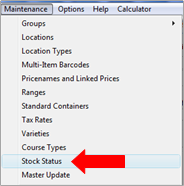
4. A window will appear with all existing Status Types
5. Click (+) to add a new Status Type
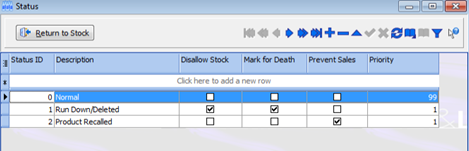
6. Enter a STATUS ID number
7. Enter a DESCRIPTION for the Status type
8. Select the following status controls:
- Disallow Stock – prevents certain stock management activity
- Mark for Death – used to run down stock then deactivate products
- Prevent Sales – prevents sales of the product
- Priority – a rating scale ‘1’ being the highest priority and ‘99’ being the lowest
9. Tick (✓) to save
Comments
0 comments
Please sign in to leave a comment.